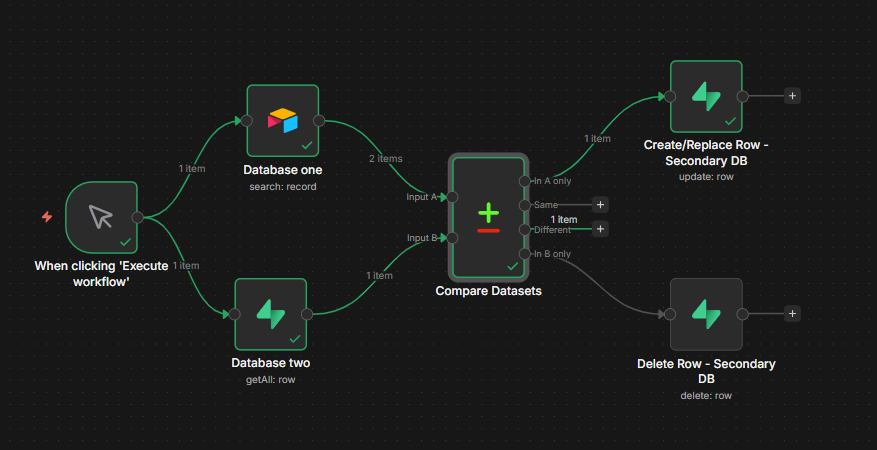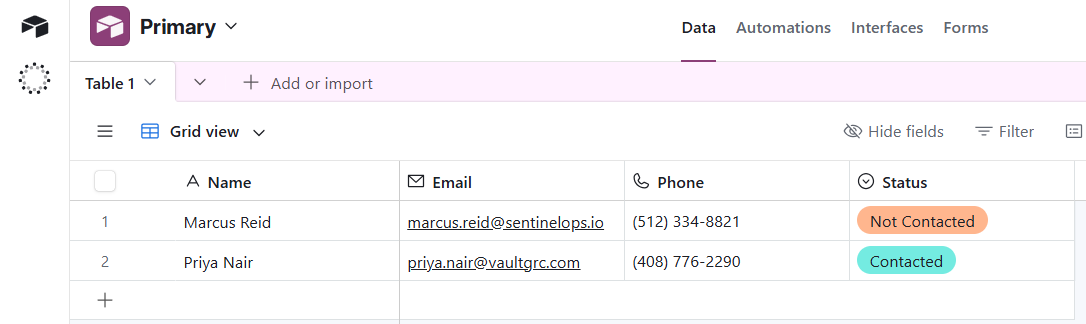
Automates synchronization between a Primary and Secondary database using n8n's Compare Datasets node. Only creates, updates, or deletes rows where data has actually changed, preventing duplicate writes and stale records.
The Problem
Security operations teams manage data across multiple systems:
- Asset inventories drift between your CMDB and your SIEM
- Alert records in your ticketing system go stale when source data updates
- Manual reconciliation between client databases takes hours per week
- Duplicate or outdated records cause missed detections and false positives
The Solution
An n8n workflow that runs on a schedule (or trigger), pulls records from both databases, compares them field by field, then only acts on what changed.
Workflow Logic
- Fetch all records from Primary DB (source of truth)
- Fetch all records from Secondary DB (sync target)
- Compare Datasets node identifies: new rows, updated rows, deleted rows
- Create/Replace rows in Secondary DB for new or changed records
- Delete rows in Secondary DB that no longer exist in Primary
Security Use Cases
- Sync asset inventory between your CMDB and vulnerability scanner
- Keep client contact records consistent across CRM and ticketing system
- Mirror alert data from primary SIEM into a reporting database
- Replicate user access records from IAM into a compliance audit table
Stack
- n8n (self-hosted)
- Supabase (Primary + Secondary DB via REST API nodes)
- Compare Datasets node (built-in n8n)